Dynamic Arrays vs Traditional Excel Formulas: Which is Better for Data Analysis?
Introduction
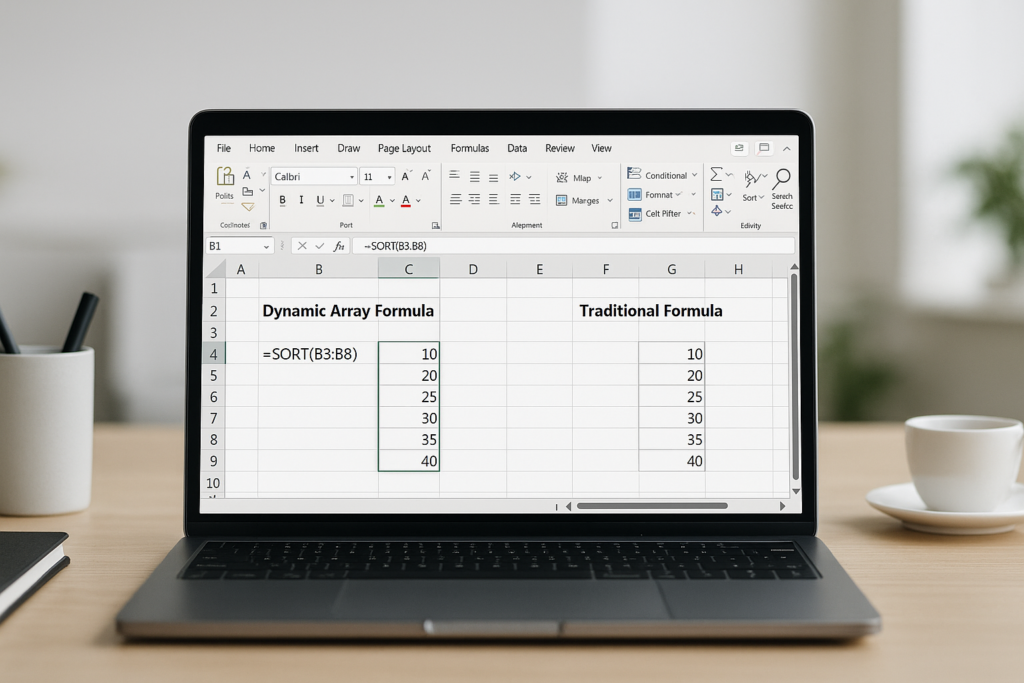
Data analysis using Excel has evolved significantly with the introduction of dynamic arrays. Traditional Excel formulas have served users for decades, but dynamic arrays bring new capabilities that can dramatically improve how you work with data. This article compares dynamic arrays vs traditional Excel formulas to help you decide which is better for your data analysis needs.
Understanding Traditional Excel Formulas
Traditional Excel formulas typically operate on single cells or require manual replication across ranges. These formulas often involve functions like SUM(), VLOOKUP(), INDEX(), and MATCH(). While powerful, they can be limited when dealing with complex datasets or when trying to return multiple results simultaneously.
For example, to extract unique values from a list, traditional formulas require array formulas or complex helper columns, which can be difficult for many users to implement effectively.
Example: Extracting Unique Values Using Traditional Formulas
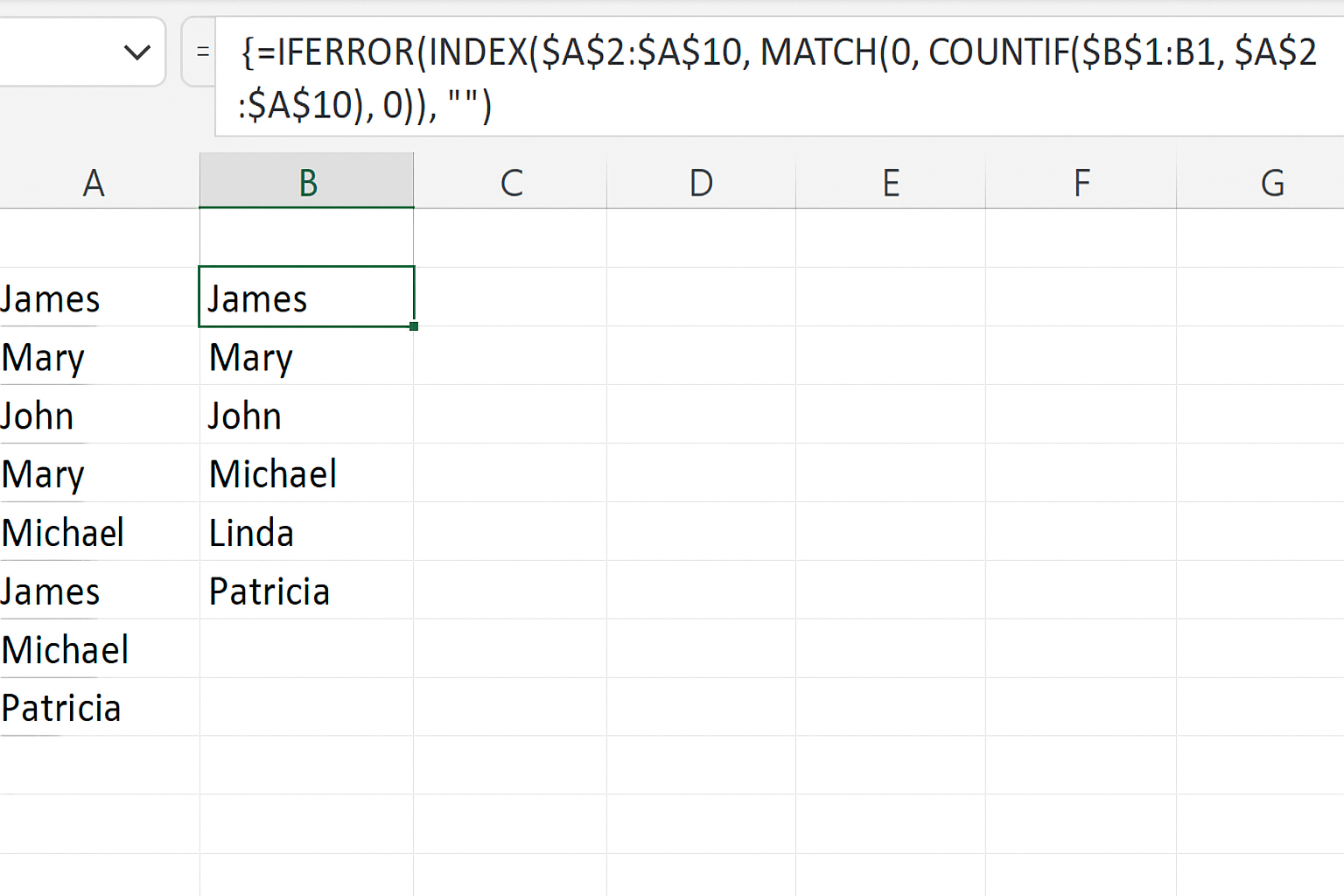
Suppose you have a list of names in A2:A10. To extract unique values, you might use an array formula like:
=IFERROR(INDEX($A$2:$A$10, MATCH(0, COUNTIF($B$1:B1, $A$2:$A$10), 0)), "")
This formula must be entered with Ctrl+Shift+Enter, is complex, and can be slow with large datasets.
Introduction to Dynamic Arrays
Dynamic arrays are a newer feature introduced in Excel 365 and Excel 2021 that allow formulas to return multiple values that spill over adjacent cells automatically. This eliminates the need for manual copying or complex array formulas.
Functions like UNIQUE(), SORT(), FILTER(), and SEQUENCE() leverage dynamic arrays to simplify data analysis tasks.
Example: Extracting Unique Values Using Dynamic Arrays
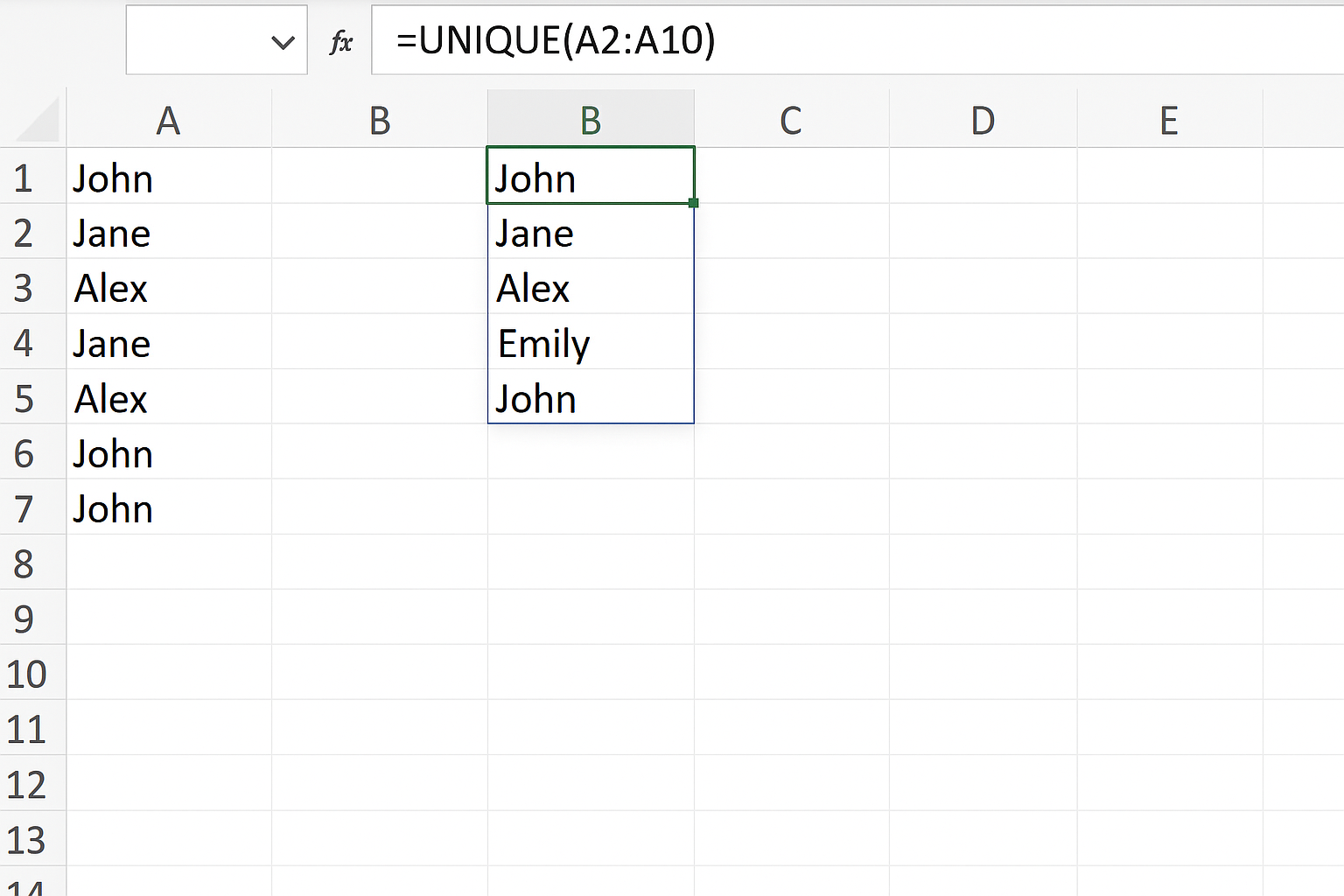
Using the same list in A2:A10, the unique values can be extracted simply as:
=UNIQUE(A2:A10)
This formula spills the unique values into adjacent cells automatically, simplifying the process and improving performance.
Key Differences Between Dynamic Arrays and Traditional Formulas
- Ease of Use: Dynamic arrays simplify formulas by reducing complexity and eliminating the need for manual copying.
- Performance: Dynamic arrays perform better with large datasets due to optimized calculation engines.
- Readability: Formulas using dynamic arrays are easier to read and maintain.
- Functionality: Dynamic arrays enable new functions like
FILTER()andSORT()that are difficult to replicate with traditional formulas.
Practical Examples in Data Analysis
1. Filtering Data Dynamically
Traditional method requires helper columns or complex array formulas:
=IF(A2="","",IF(A2="Completed",B2,""))
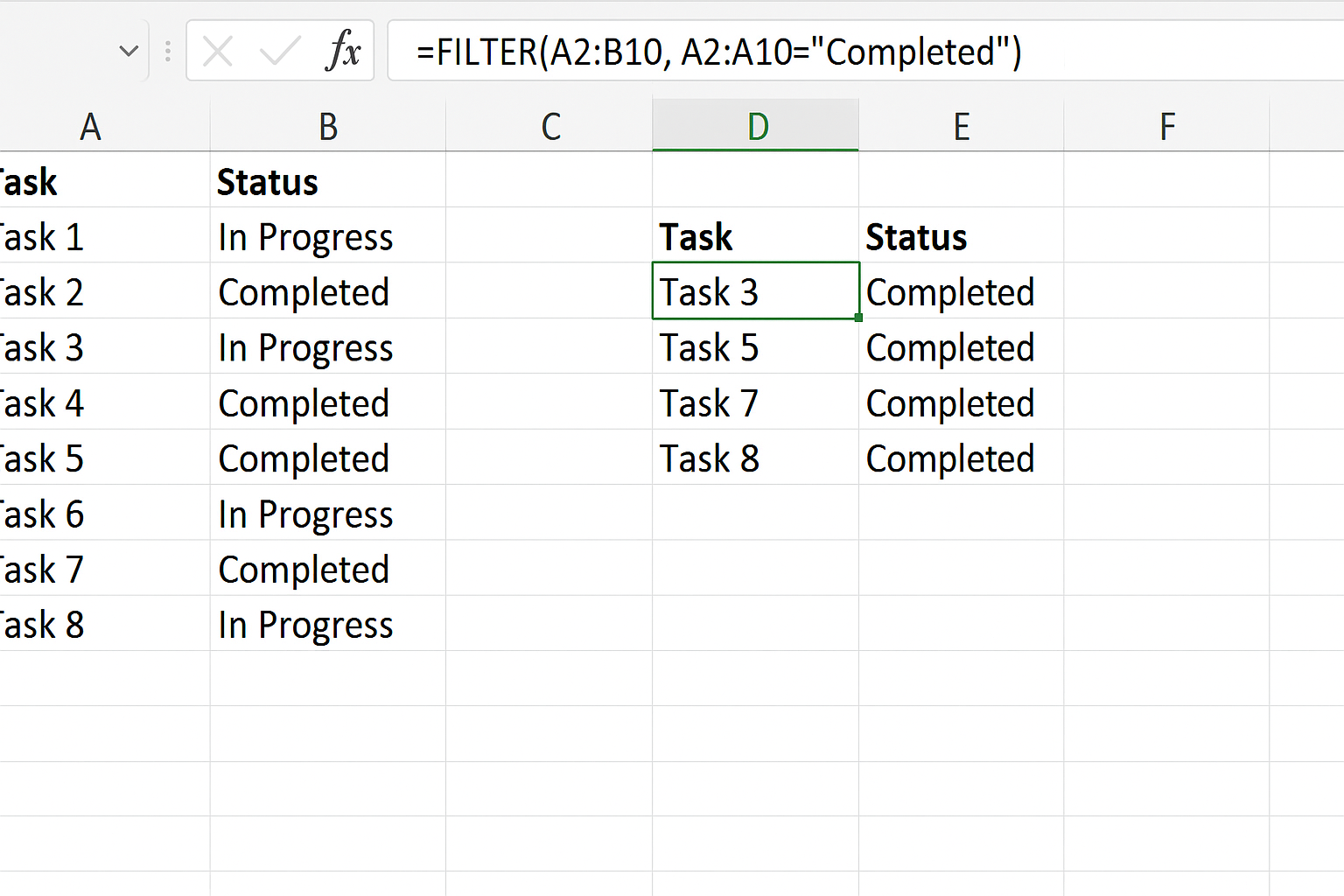
With dynamic arrays, you can use:
=FILTER(A2:B10, A2:A10="Completed")
This returns all rows where the status is “Completed” without extra steps.
2. Sorting Data
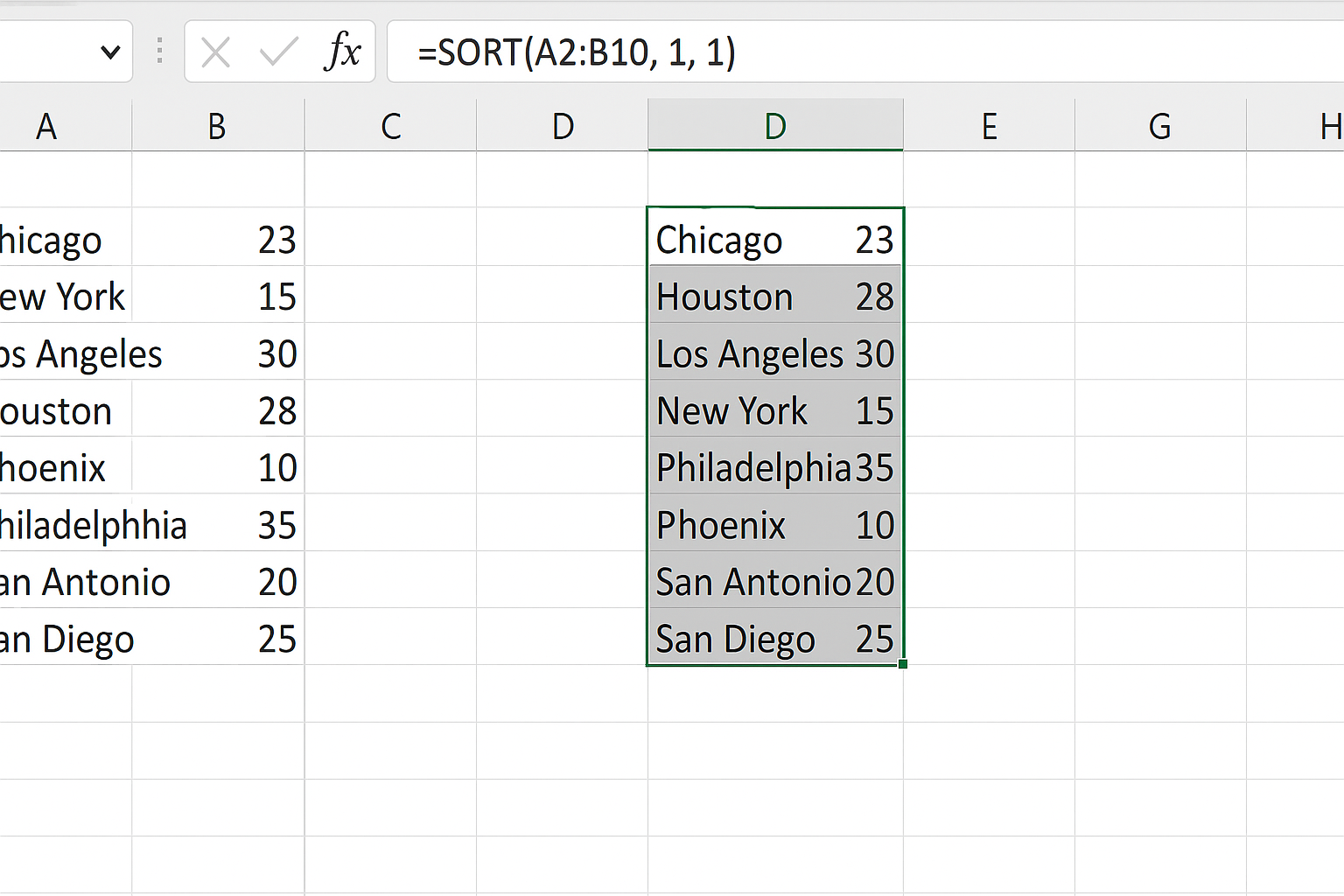
Traditional formulas cannot sort without VBA or manual sorting. Dynamic arrays offer:
=SORT(A2:B10, 1, 1)
This sorts the range by the first column in ascending order and spills the results.
3. Generating Sequential Numbers
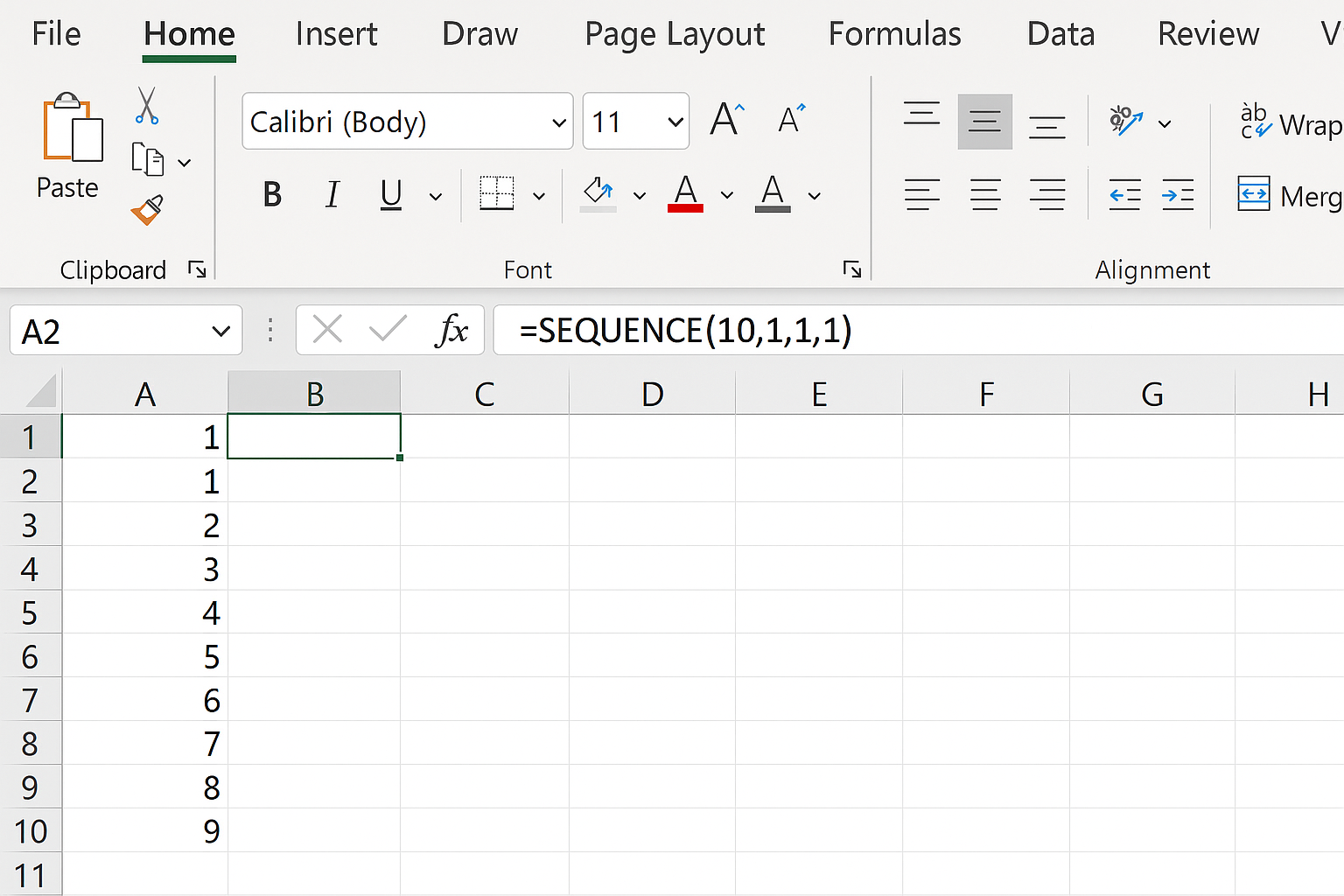
Instead of filling cells manually or dragging down a formula:
=SEQUENCE(10,1,1,1)
Generates numbers 1 through 10 vertically spilled in cells.
Limitations of Dynamic Arrays
Despite their advantages, dynamic arrays require Excel 365 or Excel 2021 and later. Users with older Excel versions must rely on traditional formulas. Also, some complex legacy models may not immediately benefit from dynamic arrays without redesign.
Which is Better for Data Analysis?
While traditional Excel formulas are familiar and compatible with all versions, dynamic arrays provide superior ease, flexibility, and functionality for modern data analysis. If your workflow and Excel version support dynamic arrays, they are generally the better choice.
Conclusion
The debate of dynamic arrays vs traditional Excel formulas comes down to functionality, ease of use, and performance. Dynamic arrays represent a significant advancement, simplifying formula creation and enhancing data analysis capabilities. For users with access to modern Excel versions, adopting dynamic arrays will improve productivity and allow tackling more complex data tasks with less effort.
FAQ
1. What are dynamic arrays in Excel?
Dynamic arrays are Excel formulas that return multiple values spilling into adjacent cells automatically, introduced in Excel 365 and Excel 2021.
2. Can I use dynamic arrays in older versions of Excel?
No, dynamic arrays are only available in the latest Excel versions; older versions require traditional formulas.
3. Are dynamic arrays faster than traditional formulas?
Yes, dynamic arrays often calculate faster and more efficiently, especially with large datasets.
4. Do dynamic arrays replace all traditional formulas?
No, they complement them. Some functions and legacy models still rely on traditional formulas.
5. How do dynamic arrays improve data analysis?
They simplify formula creation, enable new functions like FILTER and SORT, and allow automatic spilling of results, making data manipulation easier.
Related Articles
- Understanding Dynamic Array Functions in Excel: A Beginner’s Guide
- Top Excel Dynamic Array Formulas You Should Know
- How to Use the Excel FILTER Function with Dynamic Arrays
- Mastering the Excel SORT Function Using Dynamic Arrays
- Using the UNIQUE Function in Excel to Extract Distinct Values with Dynamic Arrays
Want practical Excel help?
Support free Excel tutorials, get weekly tips, or contact us for Excel programming, VBA, Power Query, dashboards, and automation work.